
1 min read
9 Signs When To Move Beyond QuickBooks for Global Trade
Move beyond QuickBooks when your global trade operations create more manual work than your accounting system can absorb. Specifically, when you're...

Discover how NEX significantly enhanced First Atlantic Commerce's
operations, billing processes, and overall data management efficiency.
15 min read
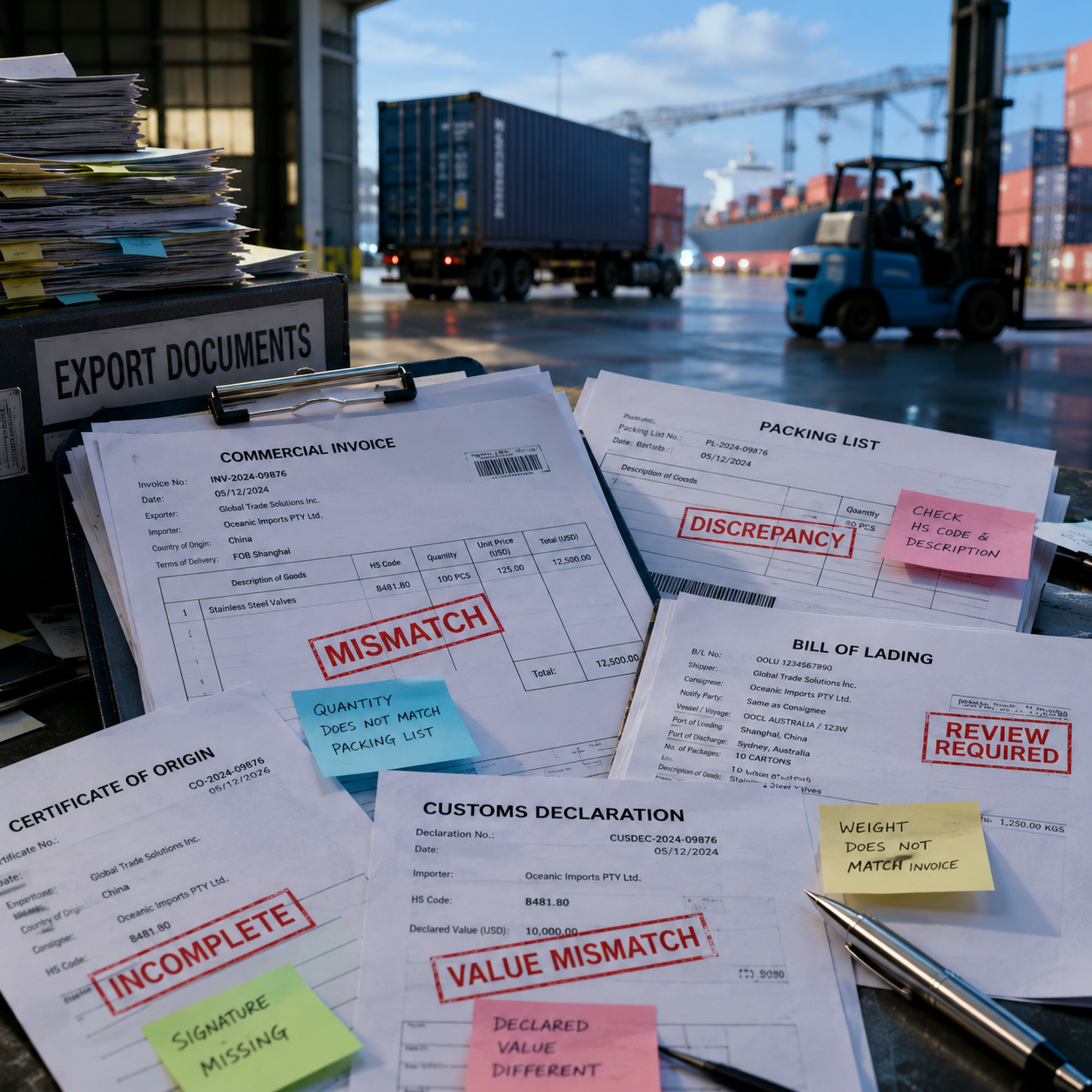
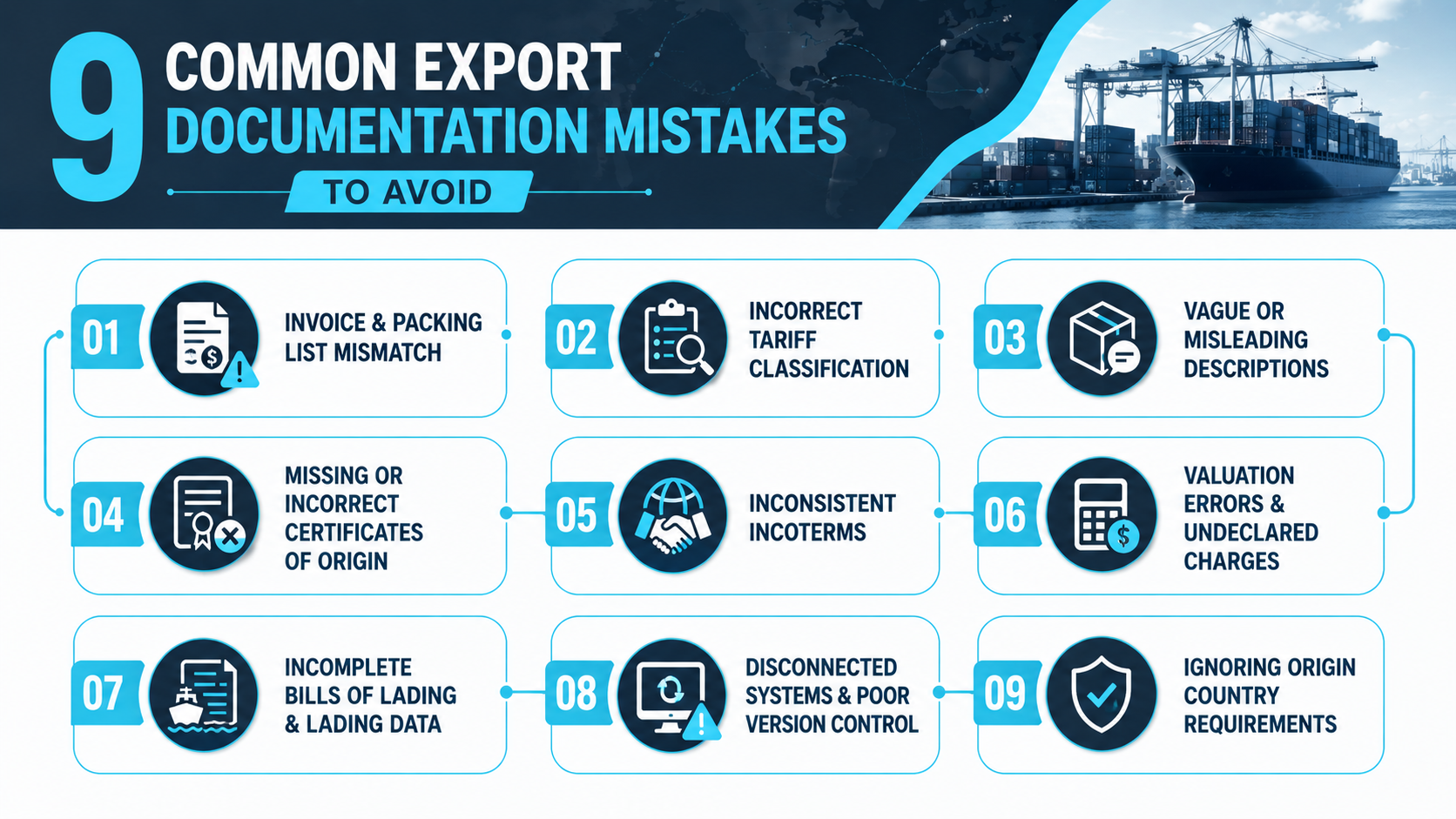
Import and export businesses make many recurring documentation mistakes that trigger customs delays, fines, and shipment holds: invoice and packing list mismatches, incorrect tariff classification, vague product descriptions, missing certificates of origin, inconsistent Incoterms, valuation errors, incomplete bills of lading, and more.
One of the reasons these errors happen is that most logistics teams manage export documentation across QuickBooks, spreadsheets, and freight forwarder portals, manually re-keying data at every step. Each transfer introduces transcription errors, outdated information, and version conflicts that customs authorities flag immediately during cross-checks.
For operations teams running international trade from QuickBooks-based workflows, the path to fewer delays and lower costs starts with understanding exactly where documentation breaks down, why customs brokers and customs officials reject incomplete or inconsistent documents, and how integrated systems eliminate the manual processes that cause most common documentation errors.
This guide walks through each mistake in practical terms, shows how it appears in real workflows, explains the customs and financial consequences, and provides specific steps to tighten documentation processes and reduce errors before shipments leave the warehouse.
Invoice and packing list mismatches are one of the most common errors, flagged immediately by customs brokers during cross-checks.
Incorrect tariff classification leads to misclassification penalties, reassessed duties, and shipment delays at customs clearance.
Vague product descriptions without material or function details force customs officials to request clarification and hold shipments.
Missing or incorrect certificates of origin prevent preferential tariff treatment and increase customs duties unnecessarily.
Valuation errors that omit assists or freight appear as under-valuation, inviting scrutiny and fines from customs authorities.
Inconsistent data across systems happens when QuickBooks, warehouse software, and freight portals aren't synced, creating conflicting export documents.
Automate document generation from QuickBooks data to eliminate manual re-keying and ensure all export documentation reflects accurate, consistent information.
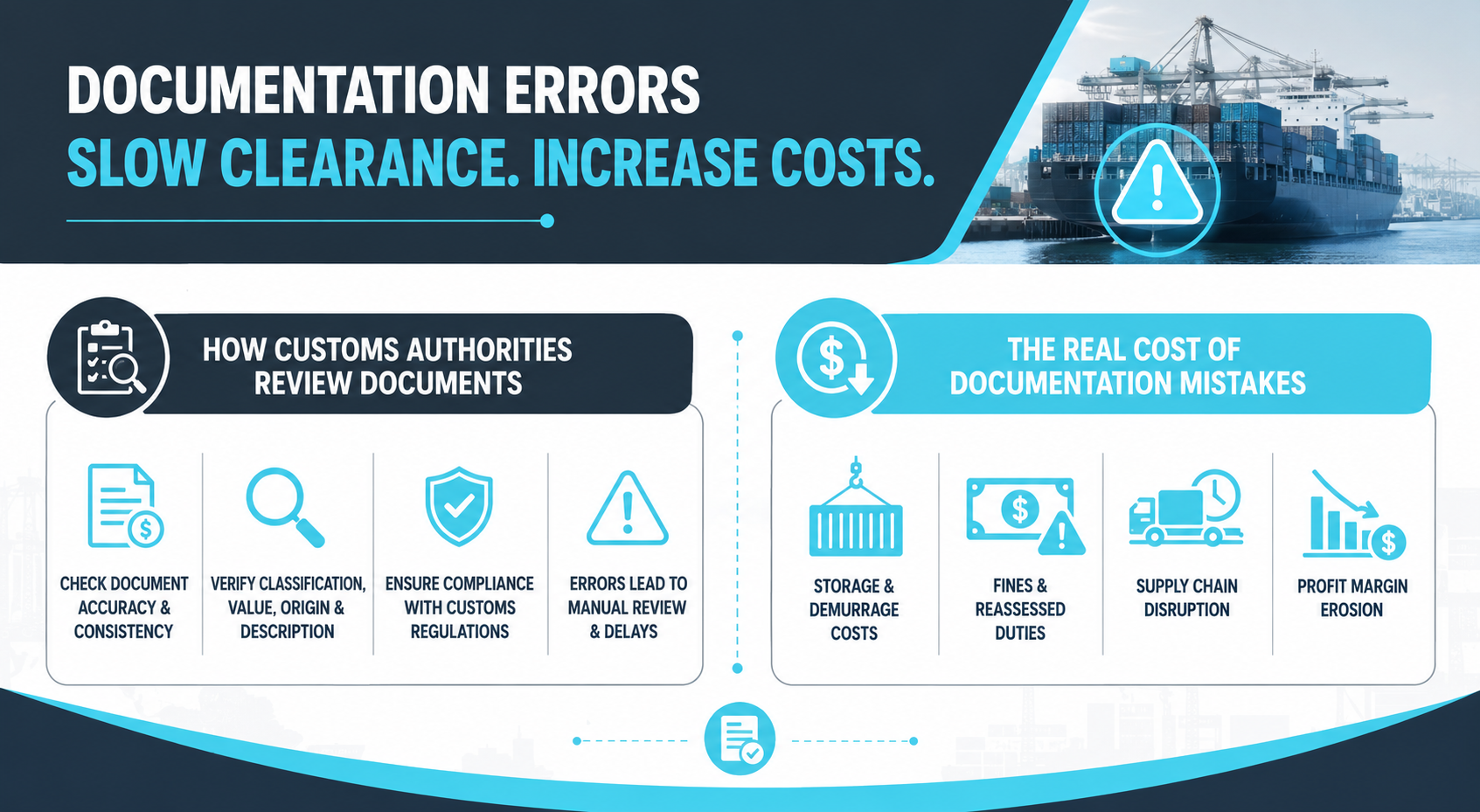
Documentation errors create systemic risk across your entire supply chain. Customs authorities operate under strict regulatory frameworks that require complete, consistent, and accurate documentation for every import and export transaction. When documents fail to meet these standards, the shipment moves from automated clearance into manual review, where customs officials scrutinize every detail.
Every export or import shipment is reviewed against the documents submitted with it. The declared value of the goods, tariff classification, country of origin, commodity details, and product descriptions must align across the commercial invoice, packing list, bills of lading, and certificate of origin.
Before submission, customs brokers may double-check these details to reduce errors, ensure compliance, and catch common documentation mistakes. The final review, however, sits with the customs authority, which checks whether the shipment meets customs regulations, import regulations, export regulations, and wider regulatory compliance requirements.
During this review, line items, quantities, Incoterms, declared values, and duties and taxes are compared to confirm that the shipment has been classified and valued correctly. Any mismatch, missing detail, or unclear description can move the shipment into manual review, resulting in delays in customs clearance, additional questions, audits, or reassessed customs duties.
Even a common error, such as a mismatch between the invoice and packing list, can signal possible non-compliance. Misclassification, incorrect valuation, or failing to include the right certificate of origin can also lead to costly delays, fines, and problems with the export or import process.
Minor documentation mistakes can create operational and financial consequences that extend far beyond the initial shipment delay.
Storage and demurrage costs: Shipment delays at customs can result in container storage fees, demurrage charges, and warehouse holding costs that accumulate daily.
Fines and reassessed customs duties: Misclassification, under-valuation, missing certificates, or errors in export documentation can lead to fines, back-duty assessments, and interest charges from customs authorities.
Supply chain disruption: Delayed shipments can miss delivery windows, disrupt production schedules, and damage customer relationships, especially in just-in-time supply chains.
Profit margin erosion: Unplanned costs from fines, storage, expedited freight, documentation rework, and customs clearance delays can reduce profit margins and turn profitable orders into break-even or loss-making transactions.
Avoiding these common mistakes starts with a clear documentation process, accurate commercial invoice details, correct tariff classification, and a careful review of every export document before submission. Importers and exporters can also partner with a customs broker or use documentation services to reduce errors, ensure compliance, and avoid costly mistakes in international trade.
Read Next: Top Supply Chain Management Issues in 2025—and How Smart Companies Are Solving Them
Most documentation mistakes follow predictable patterns. They often happen at points in the workflow where manual processes, disconnected systems, outdated templates, or incomplete regulatory knowledge create gaps between what customs authorities require and what exporters actually provide.
Understanding these patterns helps logistics teams see where their documentation process is vulnerable and where stronger controls, better review steps, or automation can reduce errors, avoid costly mistakes, and prevent delays in customs clearance.
When the commercial invoice shows different quantities, unit values, weights, or total amounts from the packing list, customs authorities can quickly flag the discrepancy. The invoice explains the value of the goods, while the packing list confirms what was physically shipped. If the two do not match, customs officials may question whether the shipment details are complete, accurate, or compliant.
This is one of the most common documentation mistakes because teams often update one document without updating the other. For example, a sales order may change in QuickBooks, while the packing list remains based on an earlier warehouse pick list or spreadsheet.
The result is delays in customs while the importer or exporter provides clarification or corrected export documents. In some cases, the customs authority may reassess customs duties based on the higher declared value. To avoid this costly mistake, double-check that the commercial invoice and packing list use the same source data before submission.
Tariff classification determines the rate of customs duties applied to imported goods, so getting it wrong can lead to misclassification penalties, back-duty assessments, fines, and shipment delays. Customs authorities require accurate Harmonized System codes that reflect the commodity’s material, function, and intended use.
This common error happens when exporters assign generic codes, reuse outdated codes, or select a classification based only on a similar product. It also happens when export documentation does not include enough detail for customs officials to verify the classification.
Misclassification can result in the importer paying higher duties than necessary, or it can trigger audits if customs authorities suspect systematic under-declaration. Correct tariff classification requires checking official tariff schedules, understanding the specific regulations of the target market, and working with customs brokers when the classification is unclear.
Read Next: HS Code Classification Mistakes: The Hidden Compliance Risk Slowing Down Importers
Generic product descriptions such as “parts,” “equipment,” “samples,” or “clothing” are a top export documentation mistake because they do not give customs officials enough information to understand what is being shipped.
A clear product description should support the tariff classification, valuation, and compliance review. It should explain what the product is, what it is made of, how it is used, and any technical details needed to verify the correct HS code.
Common missing details that cause delays include:
Material composition: Failing to specify whether a product is steel, aluminum, plastic, textile, or composite.
Function or use: Not explaining whether a component is for industrial machinery, consumer electronics, automotive use, or another application.
Technical specifications: Omitting dimensions, weight, voltage, capacity, model number, or other measurable attributes.
Brand or model information: Leaving out identifiers that help customs officials compare declared values against market prices.
Exporters often overlook this because the buyer and the seller already understand the product. However, customs regulations require explicit, verifiable descriptions. Avoiding these common mistakes means writing product descriptions as if the customs official has never seen the product before.
Read Next: Why Inventory Visibility Breaks and How Leading Teams Are Fixing It
A certificate of origin verifies the country of origin of goods and may determine whether the importer qualifies for preferential tariff treatment under a free trade agreement. When the certificate is missing, incomplete, expired, or incorrect, the importer may lose access to reduced duty rates and pay full customs duties instead.
Customs authorities also use certificates of origin to enforce trade restrictions, anti-dumping rules, and country-specific regulations. Incorrect origin documentation can result in shipment holds, fines, rejected claims, or additional documentation requests.
A common mistake exporters and importers make is confusing the shipment origin with the country of origin. The shipment origin is where the goods were loaded or exported from. The country of origin is where the goods were manufactured or substantially transformed.
To avoid costly mistakes, confirm origin rules before the export of goods, complete the certificate accurately, and partner with a customs broker when preferential tariff treatment depends on strict origin requirements.
Incoterms define who is responsible for freight, insurance, customs duties, delivery costs, and risk transfer during international trade. When Incoterms appear differently across the commercial invoice, purchase order, shipping instructions, or bills of lading, confusion and delays can follow.
This issue is separate from general valuation errors because Incoterms affect which costs should be included in the declared value of the goods. For example, if the commercial invoice shows “FOB” but the freight documentation references “CIF,” customs officials may question whether freight and insurance were included correctly.
Exporters make this mistake when sales teams quote one set of terms, logistics teams ship under another, and finance teams invoice using a different version. Ensuring compliance means standardizing Incoterms across all export documents and confirming that the buyer and the seller, freight forwarder, importer, exporter, and customs broker are working from the same terms.
Valuation errors happen when the declared value of the goods does not include all costs required under customs regulations. Depending on the destination country, Incoterms, and transaction structure, customs authorities may require certain assists, royalties, freight, insurance, tooling, or other charges to be included in the customs value.
When exporters fail to include these costs, the declared value may appear artificially low. Customs officials may interpret this as under-valuation or non-compliance, which can trigger manual review, recalculation of customs duties, fines, or back-duty assessments.
Common valuation mistakes include:
Omitting assists: Failing to add the value of molds, tooling, materials, or design work supplied by the buyer.
Excluding required freight or insurance costs: Leaving out costs that should be included under the destination country’s valuation rules.
Using incorrect currency conversion: Declaring values in the wrong currency or using exchange rates that do not match the transaction date.
Using outdated pricing: Submitting an invoice that does not reflect the final agreed price, discount, or surcharge.
To avoid costly errors, importers and exporters should understand how valuation rules apply to each shipment and double-check that all relevant charges are declared accurately.
Bills of lading serve as the contract of carriage, receipt of goods, and transport record used during customs clearance. When the data is incomplete or incorrect, freight forwarders, customs brokers, and customs authorities may not be able to verify the shipment correctly.
This error is different from invoice and packing list mismatches because it focuses on transportation and carrier data. Common mistakes include incorrect consignee information, missing notify party details, wrong container or seal numbers, mismatched weights, missing marks and numbers, or incomplete vessel and routing information.
Even small errors in bills of lading can delay shipment release, create storage costs, or cause missed delivery windows. To reduce errors, loading data should be checked against the commercial invoice, packing list, booking confirmation, and freight instructions before documents are submitted.
Many common documentation errors happen because order data, inventory records, export documents, and freight documents live in separate systems that do not stay synchronized. A team may create a sales order in QuickBooks, manage inventory in spreadsheets, prepare a packing list in Excel, and send documents to a customs broker by email.
Each manual handoff creates a risk of outdated information, duplicate files, or conflicting document versions. One person may update the commercial invoice, while another continues using an older packing list. A corrected certificate of origin may be sent to the importer, but not the freight forwarder. A revised shipment quantity may be reflected in the warehouse system but not in the export documentation.
When customs officials receive conflicting export documents, they may treat the shipment as incomplete, careless, or potentially non-compliant. This can result in delays, clarification requests, corrected filings, and additional review.
The solution is to centralize the documentation process so that commercial invoices, packing lists, bills of lading, and related export documents pull from the same approved data. A clear audit trail should show which version is current, who approved it, and when it was shared with the importer, exporter, customs broker, and freight forwarder.
Read Next: Identifying and Overcoming Operational Bottlenecks in Your Business
Every target market has specific regulations beyond standard export documentation. Failing to understand those requirements is a common pitfall that can lead to shipment delays, fines, rejected entries, and non-compliance.
Some countries may require additional licenses, permits, certificates, declarations, labeling details, or language-specific documentation for certain commodities. A commercial invoice, packing list, and certificate of origin may not be enough if the destination market has extra import regulations.
Examples include phytosanitary certificates for agricultural products, import licenses for restricted goods, safety or quality certifications for electronics or machinery, and country-specific labeling requirements.
Exporters make this mistake when they treat every destination the same or rely on outdated information. To ensure compliance, research the specific regulations of each target market before exporting goods, work with a customs broker who understands local requirements, and build country-specific documentation checklists into your export documentation process.
Read Next:
QuickBooks is the financial backbone for many import and export businesses, but it was not built to manage the full documentation process for international trade. The gap between what QuickBooks handles well, such as financial accounting, invoicing, and transaction tracking, and what customs authorities require, such as complete, consistent, and compliant export documentation, is where many documentation errors begin.
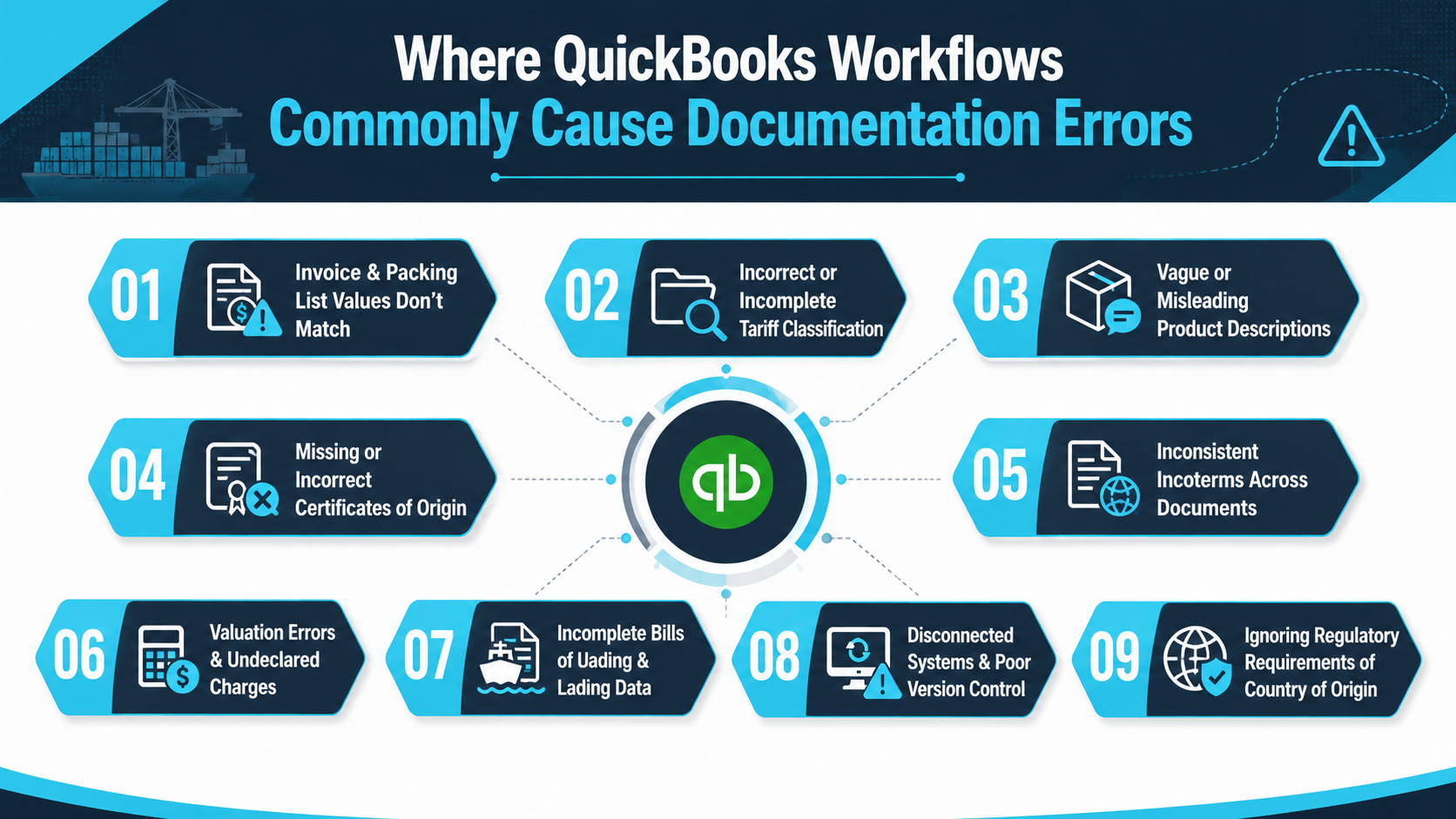
Most import and export businesses use QuickBooks to manage sales orders, invoicing, and financial records. However, QuickBooks alone does not generate the full set of export documents required for customs clearance. As a result, logistics teams often create an invoice in QuickBooks, then copy data into separate Word or Excel templates for commercial invoices, packing lists, and bills of lading. That same information may then be re-entered into freight forwarder portals or customs broker systems.
Each manual step increases the risk of transcription errors, outdated data, and version mismatches.
Common documentation mistakes that result from this workflow include:
Copy-paste errors in line items, quantities, or values: A single mistyped digit can change the declared value of the goods and trigger customs scrutiny.
Shipping changes made in QuickBooks but not reflected in export documentation: An order may be updated after the packing list has already been sent to the warehouse, creating a mismatch.
Different team members updating different versions: One person may update the commercial invoice while another updates the packing list, causing customs authorities to receive conflicting documents.
Missing or incomplete product descriptions: QuickBooks item names are often internal shorthand and may not meet customs regulations for detailed commodity descriptions.
These inconsistencies can lead to delays in customs, requests for corrected export documentation, and, in some cases, fines for non-compliance. The issue is not QuickBooks itself. The issue is the lack of an integrated workflow that connects QuickBooks financial data to compliant export documentation.
Read Next: QuickBooks Desktop Discontinued: What This Means for Your Business
QuickBooks is a strong financial accounting system for invoicing, accounts receivable, and general ledger functions. However, it was not designed to manage complex import and export documentation from order creation through shipment release.
It does not automatically generate every required export document, such as packing lists, bills of lading, certificates of origin, customs declarations, and compliance documents, in a unified workflow. It also does not manage multi-stage shipments across multiple warehouses, coordinate freight forwarder communication, or handle trade-specific requirements such as letters of credit, landed cost calculations, and country-specific compliance tasks.
For logistics teams, this means QuickBooks can remain the financial system of record, but surrounding it with spreadsheets, email attachments, manual templates, and disconnected tools creates the conditions for common documentation errors, costly delays, and compliance issues.
NEX's Import Export Software for QuickBooks helps close these gaps by connecting order management, shipping, compliance, and financial tracking in one platform. It automates the generation of invoices, packing lists, bills of lading, and compliance documents, while keeping documentation connected to QuickBooks financial data.
With support for customs declarations, letters of credit, multi-warehouse tracking, landed cost visibility, and freight forwarder communication, NEX helps import and export businesses reduce manual data entry, avoid documentation mistakes, and manage international trade workflows with greater accuracy.
Read Next:
The Benefits of Integrating QuickBooks with Enterprise Software: Scaling Your Business Efficiency
QuickBooks vs ERP: Which Is the Right Fit for Your Business?
Reducing documentation errors requires more than knowing the common export documentation mistakes that delay shipments. Logistics teams need a systematic way to review current workflows, identify weak points, and add controls that catch errors before documents reach customs authorities.
A strong audit should show where shipment data originates, where manual re-entry happens, who reviews each document, and which systems create the highest risk of mismatched information. This helps teams prioritize the changes most likely to reduce customs delays, avoid costly mistakes, and improve regulatory compliance.
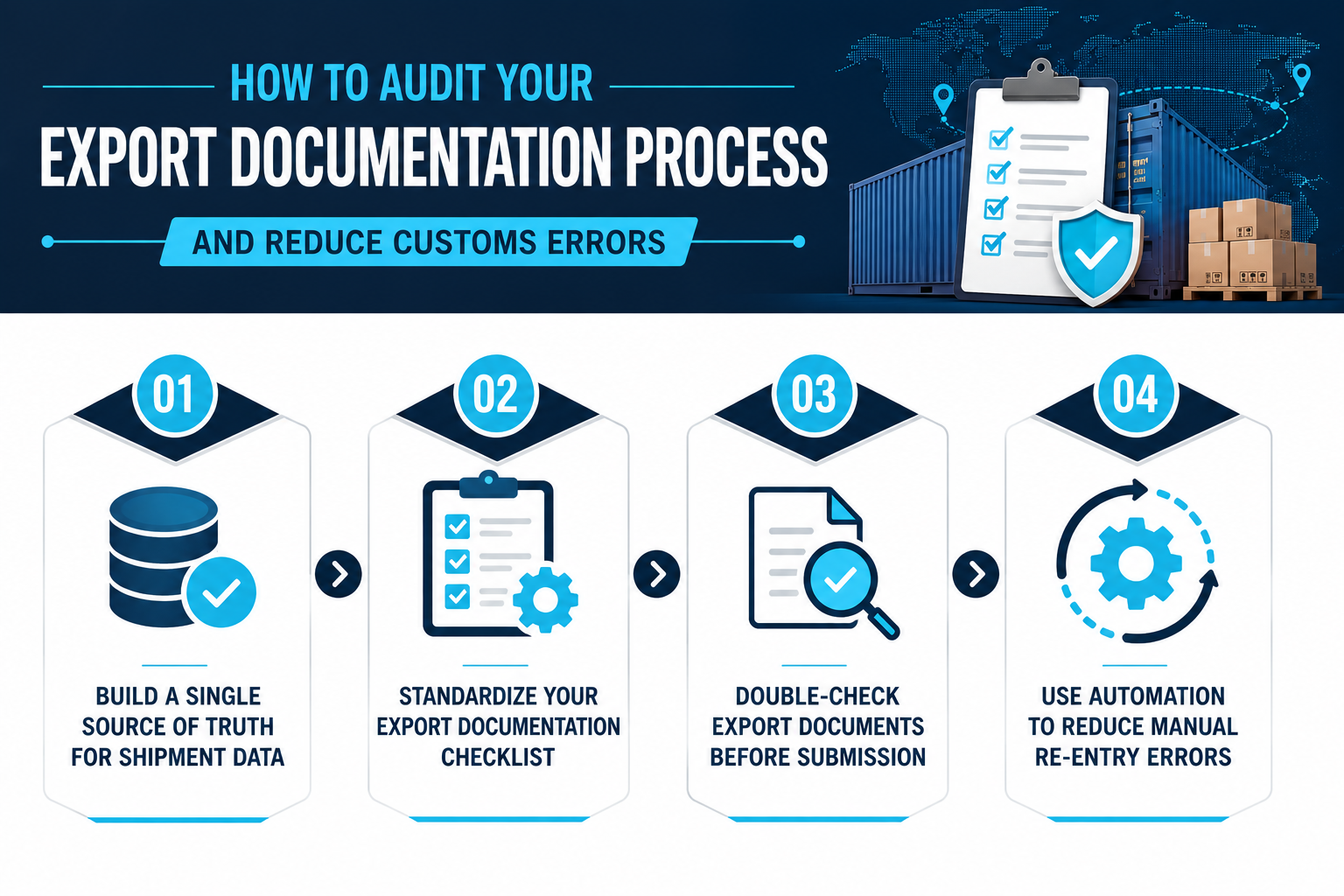
The first step is mapping where each key data point comes from and deciding which system should own it. Product descriptions, tariff classifications, quantities, Incoterms, declared values, and country of origin details should not live in several disconnected places without a clear source of truth.
When shipment data is spread across QuickBooks, spreadsheets, warehouse systems, and freight forwarder portals, every manual transfer increases the risk of mismatched export documents. One team may update an order quantity in QuickBooks while another continues using an older spreadsheet, creating differences between the commercial invoice and packing list.
To reduce errors, identify the system of record for each data point, eliminate duplicate entries where possible, and make sure updates flow into downstream export documentation. This reduces the common mistake of different teams working from different versions of the same shipment data.
A standardized checklist helps teams catch export documentation mistakes to avoid before documents are sent to customs brokers, freight forwarders, or customs authorities. The checklist should be used for every shipment, especially when goods move across multiple warehouses, countries, or compliance requirements.
A practical checklist should cover:
Commercial invoice completeness: Verify buyer and seller details, Incoterms, declared value, currency, payment terms, and country of origin.
Packing list alignment with invoice: Confirm that quantities, weights, dimensions, and product descriptions match the commercial invoice.
Bills of lading accuracy: Double-check consignee details, notify party information, container numbers, seal numbers, marks, and shipment references.
Certificate of origin presence and correctness: Ensure the certificate is complete, signed, and reflects the actual country of origin, not only the shipment origin.
Tariff classification checked: Verify that HS codes are current, accurate, and supported by detailed product descriptions.
Country-specific documentation: Confirm that any additional licenses, permits, certificates, or declarations required by the target market are included.
Understanding common pitfalls and building them into a checklist helps logistics teams prevent incomplete documentation, reduce customs clearance delays, and avoid costly rework.
Clear ownership is essential for reducing mistakes in documentation. Assign one person or team to complete the final review of all export documents before they are submitted to customs brokers or freight forwarders.
This review should include a cross-check between the commercial invoice, packing list, bills of lading, and any certificate of origin or compliance document required for the shipment. Values, quantities, product descriptions, Incoterms, and country of origin details should match across every document.
When multiple people touch export documentation, version control also becomes important. Teams should know which document is current, who approved it, and whether older versions have been replaced. Without that control, outdated invoices, packing lists, or shipment instructions can continue circulating and create confusion during customs review.
These internal controls help catch common documentation mistakes before they result in delays in customs, fines, or non-compliance.
Automation should be prioritized where manual re-keying creates the highest risk. For many import and export businesses, that risk appears when teams copy data from QuickBooks or warehouse systems into separate Word templates, Excel sheets, shipping documents, and freight forwarder portals.
Focus automation on areas such as:
Generating export documents from one integrated system: Commercial invoices, packing lists, bills of lading, and compliance documents should pull from shared order and shipment data instead of being recreated manually.
Updating downstream documents when orders change: If an order quantity, value, or shipment detail changes, related documentation should update from the same approved data source.
Reducing errors in multi-warehouse shipments: Inventory and warehouse data should support accurate packing lists, shipment quantities, and location details, especially when goods move across multiple facilities.
Improving visibility into landed costs: Accurate freight, duty, insurance, and related cost tracking can support better valuation, customs duties assessment, and profitability review.
Automation does not replace compliance review, but it reduces the repetitive manual work that often creates documentation errors, shipment delays, and conflicting records.
Read Next:
Documentation quality is not just a back-office detail; it directly affects customs clearance speed, supply chain reliability, and profit margins. The common documentation errors import and export businesses make often stem from fragmented workflows, manual re-keying, and disconnected systems that separate QuickBooks financial data from export documentation. QuickBooks may remain the core financial system for many importers and exporters, but stronger documentation processes and connected workflows are essential to avoiding costly delays, fines, and non-compliance.
Key takeaways:
Align documents from a single data source: Eliminate mismatches between commercial invoices, packing lists, and bills of lading by ensuring export documentation pulls from consistent shipment data.
Treat classification and valuation as compliance work: Incorrect tariff classification and under-declared values are not minor mistakes; they can lead to misclassification penalties, reassessed customs duties, and profit margin erosion.
Automate export documentation generation from QuickBooks: Reduce common error patterns by using integrated software that creates invoices, packing lists, and compliance documents from shared order data, reducing manual re-entry and version mismatches.
When documentation is reliable, customs clearance becomes easier to manage, and shipment timelines are less vulnerable to preventable errors.
NEX's Import Export Software for QuickBooks supports this by connecting order management, compliance, logistics, and financial tracking in one platform. It helps businesses automate invoices, packing lists, bills of lading, and compliance documents; supports letters of credit, customs declarations, compliance certificates, freight forwarder communication, multi-warehouse tracking, and landed cost visibility; and integrates directly with QuickBooks financials.
Reduce documentation errors to streamline customs clearance and protect your shipment timelines.
The most common export documentation mistakes to avoid include invoice and packing list mismatches, incorrect tariff classification, vague product descriptions, missing certificates of origin, inconsistent Incoterms, valuation errors, incomplete bills of lading, poor version control, and ignoring country-specific regulatory requirements. These mistakes can delay customs clearance, trigger manual review, and lead to fines or reassessed customs duties.
Export customs clearance usually requires a commercial invoice, packing list, bills of lading, certificate of origin, and any country-specific documents such as customs declarations, import licenses, safety certifications, or phytosanitary certificates. The exact requirements depend on the commodity, destination country, Incoterms, and applicable customs regulations.
Delays in customs clearance often happen when export documents are incomplete, inconsistent, or unclear. Common causes include mismatched invoice and packing list details, incorrect HS codes, vague product descriptions, missing certificates of origin, incorrect declared values, incomplete bills of lading, and documents that do not meet destination country requirements.
Customs authorities may reject export documents when they contain missing information, conflicting values, incorrect tariff classification, unclear product descriptions, wrong country of origin details, or unsupported valuation. Rejection can also happen when required documents, such as certificates of origin, customs declarations, or country-specific permits, are missing or incomplete.
Invoice and packing list mismatches affect customs clearance because customs officials compare both documents to verify what was sold, packed, and shipped. If quantities, weights, product descriptions, or declared values do not match, the shipment may be flagged for manual review, corrected documentation, reassessed customs duties, or fines.
If the HS code or tariff classification is wrong, customs authorities may reclassify the goods, reassess customs duties, delay the shipment, or issue penalties for misclassification. Incorrect classification can also create audit risk if customs officials believe similar mistakes have occurred across past import and export shipments.
QuickBooks can remain the financial system of record, while export documentation workflows are tightened around it. Errors usually happen when teams copy data into spreadsheets, packing lists, bills of lading, or freight portals manually. NEX Import Export Software for QuickBooks helps reduce manual re-entry by automating invoices, packing lists, bills of lading, and compliance documents while supporting customs declarations, letters of credit, freight forwarder communication, multi-warehouse tracking, and landed cost visibility.

1 min read
Move beyond QuickBooks when your global trade operations create more manual work than your accounting system can absorb. Specifically, when you're...

1 min read
Your shipment is stuck in customs because of incorrect or incomplete data. In the vast majority of cases, customs holds trace back to wrong HS...

1 min read
QuickBooks Online is one of the most widely used accounting systems for small and mid-sized businesses. It handles bookkeeping, invoicing, financial...