
1 min read
10 Best Inventory Management Software for QuickBooks (2026)
If you're using QuickBooks, you've probably realized its inventory management features only go so far. Are you manually updating inventory data,...

Discover how NEX significantly enhanced First Atlantic Commerce's
operations, billing processes, and overall data management efficiency.
16 min read

For small businesses that have outgrown QuickBooks operationally, the most relevant ERP alternatives are platforms that add stronger inventory, order, purchasing, warehouse, manufacturing, and workflow capabilities while QuickBooks remains in place for accounting.
That need is common as companies add more systems. In Intuit QuickBooks' July 2026 Small Business Insights survey, 36% of small businesses reported problems with a lack of integration between their digital tools and systems. When orders, inventory, purchasing, fulfillment, and accounting data sit in separate tools, teams spend more time re-entering information, reconciling spreadsheets, and checking which record is current.
The result can be stockouts, excess inventory, fulfillment delays, incorrect costs, and slower invoicing. A full ERP system may eventually make sense, but many growing businesses can first add an operational layer around QuickBooks:
QuickBooks + Spreadsheets → QuickBooks + Operations Platform → Full ERP If Business Requirements Eventually Demand It
NEX Driver is one example of this middle category, connecting operational workflows while QuickBooks continues to handle accounting.
An ERP alternative gives a growing business more control over operations without requiring it to replace QuickBooks with a full ERP system.
For example, a distributor may still be comfortable using QuickBooks for accounting but need better ways to manage sales orders, inventory allocation, purchasing, warehouse activity, and fulfillment. Instead of moving all financial and operational processes into a traditional ERP system, the company can add an operations platform that works alongside QuickBooks.
This creates a practical progression as the business becomes more complex:
The QuickBooks + Operations Platform model is where the ERP alternatives in this guide fit, and for many businesses it can remain a long-term operating model.
In this setup, an operations platform can become the working system for processes such as sales orders, inventory, purchasing, warehouse execution, manufacturing, or service. QuickBooks continues to handle the accounting functions the business already relies on.
A typical distributor, for example, might create and fulfill an order in the operational system, allocate inventory, generate a purchase order when stock is short, and record the shipment there. The relevant invoice, bill, cost, or other accounting transaction can then move to QuickBooks according to the integration.
This approach is useful when operational complexity is driving the software decision, but the existing accounting system still meets the company's needs. The next question is:
Is that middle stage enough, or has the business reached the point where a full ERP makes more sense?
Once a business reaches this middle stage, the decision comes down to how much of the software environment needs to change. Use these four questions to narrow the path:
If the operational side of the business needs more control but the financial foundation can stay in place, the six ERP alternatives below are worth comparing. We’ll evaluate them based on QuickBooks compatibility, inventory and order capabilities, purchasing, warehouse management, manufacturing depth, broader operational coverage, and best fit for your business type.
Read More: Smarter Way to Streamline Business Processes with Workflow Automation
The six platforms below fit the middle category covered in this guide: they add stronger operational capabilities while keeping QuickBooks as the accounting system. They are not ranked from best to worst. Each serves a different type of business, so the comparison focuses on best-fit use case, operational scope, QuickBooks relationship, inventory and order capabilities, warehouse and manufacturing depth, and important trade-offs.
The options covered are inFlow Inventory, SOS Inventory, Cin7 Core, Acctivate, NEX Driver, and Fishbowl Inventory:
Best fit for: Smaller wholesalers, distributors, and light manufacturers that need stronger inventory and order management without moving to a full ERP.
inFlow is a cloud-based inventory and order management platform that brings sales, purchasing, stock, fulfillment, and related workflows into one system. For manufacturers, inFlow Manufacturing adds bills of materials, manufacturing orders, production steps, and labor and material cost tracking.
Why it stands out: inFlow is a practical step up for businesses that have outgrown spreadsheets or basic inventory tools but do not need broad enterprise functionality. Teams can manage sales and purchase orders, multi-location stock, replenishment, fulfillment, and inventory costs from the same system.
Key capabilities:
Inventory and purchasing: Multi-location stock tracking, purchase orders, reorder points, replenishment, and inventory visibility across locations.
Sales and order management: Sales orders, customer pricing, B2B selling tools, and order workflows tied to available inventory.
Warehouse and fulfillment: Picking, packing, shipping, barcode workflows, and stock movement across locations.
Manufacturing: Bills of materials, manufacturing orders, production steps, and production workflows through inFlow Manufacturing.
Cost and production tracking: Inventory costing, material cost tracking, and labor tracking for manufacturing operations.
QuickBooks relationship: inFlow currently integrates with QuickBooks Online and supports Intuit Enterprise Suite environments. Operational activity starts in inFlow: sales can create invoices in QuickBooks, purchases can create bills, payments can synchronize between the systems, and inFlow can update the inventory asset value in QuickBooks. inFlow remains responsible for day-to-day inventory management.
When it is a good fit: Consider inFlow when inventory, purchasing, sales orders, or fulfillment are the main problems and the company wants a relatively focused system. It can also suit light manufacturers that need BOM and production functionality without the broader scope of a traditional ERP.
Important consideration: inFlow's capabilities vary by plan and add-on. Features such as lot or serial tracking, Stockroom, API access, additional integrations, and some manufacturing or warehouse requirements can increase the total subscription cost. The company publishes tiered pricing, so buyers should compare the required configuration rather than the base plan alone.
Best fit for: Smaller businesses using QuickBooks Online that need stronger inventory, order management, purchasing, fulfillment, and light manufacturing capabilities.
SOS Inventory is an inventory and operations platform built specifically to work with QuickBooks Online. It adds sales orders, purchasing, multiple locations, fulfillment, traceability, assemblies, manufacturing, and related workflows without requiring the business to replace its accounting system.
Why it stands out: SOS Inventory has a particularly close relationship with QuickBooks Online. Rather than maintaining inventory independently in both systems, SOS recommends using SOS Inventory as the operational inventory system while relevant accounting data synchronizes with QuickBooks. This helps avoid duplicate inventory and cost-of-goods-sold records.
Key capabilities:
Inventory and purchasing: Inventory tracking, purchase orders, multiple locations, partial receiving, replenishment, and supplier workflows.
Sales and fulfillment: Sales orders, partial shipping, fulfillment workflows, customer portal functionality on the Pro plan, and rule-based order processing.
Traceability and warehouse control: Serial and lot tracking, barcoding, location-level inventory visibility, and returns and RMA management.
Manufacturing: Assemblies, multi-level bills of materials, work orders, work-in-progress, and more advanced manufacturing functionality on the Pro plan.
Cost and workflow management: Job costing, labor tracking, and configurable workflow automation on higher-tier plans.
QuickBooks relationship: SOS Inventory was designed around QuickBooks Online and supports two-way synchronization between the platforms. Customers, vendors, items, purchase orders, invoices, payments, and other supported records can move between SOS and QuickBooks depending on the configured workflow. SOS documentation recommends managing inventory quantities in SOS rather than maintaining inventory independently in both systems.
When it is a good fit: Consider SOS Inventory when QuickBooks Online still handles accounting effectively, but the business needs more control over sales orders, purchasing, stock across locations, fulfillment, traceability, or light manufacturing. It can be particularly practical for smaller product businesses that want a focused operational extension rather than a broad management platform.
Important consideration: Capability varies significantly by subscription tier. The entry-level Companion plan covers sales orders, assemblies, and QuickBooks integration, while unlimited locations, serial and lot tracking, and barcoding require Plus. Work orders, job costing, advanced manufacturing, and the customer portal are reserved for Pro. SOS is also specifically centered on QuickBooks Online, so businesses using other QuickBooks environments should verify compatibility before putting it on the shortlist.
Best fit for: Wholesalers, distributors, and multichannel product businesses that need stronger inventory, purchasing, order management, and warehouse control around QuickBooks Online.
Cin7 Core is a cloud-based inventory and operations platform designed for businesses that need tighter control over products, purchasing, sales orders, stock, and fulfillment across multiple locations and channels.
Why it stands out: Cin7 Core is particularly well suited to inventory-led businesses with more moving parts than a basic stock system can handle. It combines purchasing, order management, warehouse workflows, assembly manufacturing, and multichannel integrations in one platform, with more advanced capabilities available as the business grows.
Key capabilities:
Inventory and purchasing: Product management, purchase orders, unlimited inventory locations, batch and expiration tracking, and cost-of-goods-sold reporting.
Sales and fulfillment: Sales order management, wholesale inventory workflows, B2B portal options, and connections to ecommerce, marketplace, shipping, and fulfillment systems.
Warehouse management: Standard warehouse workflows support picking, packing, restocking, putaway, stock lookup, and barcode scanning. More advanced warehouse management is available on higher plans or as an add-on.
Manufacturing: Standard assembly manufacturing includes kits, bundles, bills of materials, assembly/disassembly, and batch or serial tracking. MRP and advanced production capabilities are available depending on plan and configuration.
Automation and planning: Higher tiers can add workflow automation, demand forecasting, RMA, advanced warehouse tools, and other operational capabilities.
QuickBooks relationship: Cin7 Core integrates with QuickBooks Online so operational activity can remain in Cin7 while QuickBooks continues to handle accounting. Cin7 lists QuickBooks Online as an accounting integration across its Core plans.
When it is a good fit: Consider Cin7 Core when inventory is central to the business and stock needs to stay coordinated across suppliers, sales orders, warehouses, and multiple selling channels. It can be especially useful for wholesalers and distributors that need more structure around replenishment, fulfillment, and product movement without replacing QuickBooks Online.
Important consideration: Feature depth varies substantially by plan. MRP, advanced warehouse management, forecasting, RMA, advanced production, and some automation features may require a higher tier or paid add-on. Buyers should compare the required operating model against the full plan structure rather than evaluating Cin7 only on its entry-level price.
Best fit for: QuickBooks-centric distributors and manufacturers that need stronger inventory, purchasing, order management, warehouse, and manufacturing capabilities without replacing their accounting system.
Acctivate is inventory and business management software built specifically to extend QuickBooks. QuickBooks continues to handle accounting, while Acctivate manages more complex operational processes such as inventory, purchasing, fulfillment, warehousing, and manufacturing.
Why it stands out: Acctivate is one of the most QuickBooks-focused ERP alternatives in this comparison. It supports both QuickBooks Desktop and qualifying QuickBooks Online plans, which makes it relevant to businesses that have built their accounting processes around QuickBooks but need more operational control than QuickBooks alone provides.
Key capabilities:
Inventory and traceability: Multi-location inventory, bin locations, multiple costing methods, lot tracking, serial tracking, replenishment, and real-time product visibility.
Purchasing and replenishment: Purchase order management, reorder planning, vendor information, and purchasing workflows tied to inventory requirements.
Order management and fulfillment: Sales orders, multichannel order processing, picking, packing, shipping, and fulfillment workflows.
Warehouse management: Multiple warehouses, mobile receiving and picking, bin-level control, and tools for managing inventory movement across locations.
Manufacturing: Assemblies, multi-level bills of materials, batch processing, manufacturing workflows, and support for different production models.
Reporting and customer operations: Dashboards, reporting, customer history, business analytics, ecommerce connections, and EDI capabilities.
QuickBooks relationship: Once integrated, Acctivate takes responsibility for inventory management rather than maintaining duplicate inventory quantities in both systems. Inventory transactions are performed in Acctivate, while summarized inventory values, cost-of-goods-sold journals, invoices, bills, payments, and other supported financial information synchronize with QuickBooks.
Acctivate currently supports QuickBooks Desktop as well as QuickBooks Online Plus and Advanced. The integration model differs between the two environments, so businesses should confirm the exact synchronization workflow they require.
When it is a good fit: Consider Acctivate when QuickBooks is firmly established as the accounting system but operational complexity has moved well beyond basic inventory. It can be particularly relevant for distributors and manufacturers managing multiple warehouses, lot or serial traceability, complex purchasing, higher order volumes, manufacturing, or EDI.
Important consideration: Acctivate is closely tied to QuickBooks by design. That is a strength for companies committed to keeping QuickBooks, but it is less suitable for businesses planning to replace QuickBooks and move accounting into a different financial platform. Buyers should also expect onboarding and configuration work because the integration requires mapping operational and accounting data between the two systems.
Best fit for: Growing distributors, manufacturers, importers/exporters, and product-based service businesses that want to keep QuickBooks while managing a broader set of operational workflows in one platform.
NEX Driver is a configurable, cloud-based enterprise management platform that connects customer activity, orders, purchasing, inventory, warehouses, manufacturing, shipping, service, returns, commissions, and related workflows. QuickBooks can remain the accounting system while NEX manages day-to-day operations.
Why it stands out: NEX connects a broad range of operational workflows across sales, purchasing, inventory, fulfillment, production, service, and post-sale activity. It is designed for businesses where the challenge extends beyond inventory management into coordinating processes across multiple teams.
Key capabilities:
Sales and customer operations: CRM, quotes, sales orders, customer history, follow-up activity, and workflow automation.
Inventory, purchasing, and warehouses: Inventory availability and allocation, demand-driven purchasing, replenishment, multi-location inventory, receiving, picking, packing, and shipping.
Manufacturing: Components, assemblies, production workflows, inventory requirements, production tracking, and costing.
Service and post-sale workflows: Service tickets, customer assets, repairs, warranties, RMA, returns, and replacements.
Operational controls: Commissions, approvals, alerts, reporting, documents, and configurable workflows.
QuickBooks relationship: NEX follows the operating model “NEX handles operations; QuickBooks handles the books.” QuickBooks can continue handling accounting while NEX manages operational activity through QuickBooks Integration, with relevant operational and accounting data synchronized between the systems based on the configured workflow.
When it is a good fit: Consider NEX when several operational processes need to work together in one connected environment rather than across separate spreadsheets, applications, or manual workflows. It can be particularly relevant for businesses that need stronger coordination across orders, inventory, purchasing, warehouses, manufacturing, service, and returns.
Important consideration: NEX's broader scope and configurability mean implementation should begin with clearly defined workflows, modules, integrations, permissions, and reporting requirements. Public pricing is not listed, so pricing and implementation scope need to be confirmed directly with NEX.
Best fit for: Inventory-heavy distributors, manufacturers, and warehouse operations that need stronger traceability, fulfillment, or production capabilities while continuing to use QuickBooks.
Fishbowl provides inventory, warehouse, and manufacturing software for product-based businesses. Its current product line includes Fishbowl Inventory, a cloud-based system for companies that primarily buy, stock, and sell finished goods, and Fishbowl Advanced, which adds deeper warehouse and manufacturing capabilities such as BOMs, work orders, MRP, and production scheduling.
Why it stands out: Fishbowl is particularly strong when inventory control needs to extend into detailed warehouse or manufacturing processes. Businesses can use it to manage stock movement, purchasing, fulfillment, traceability, and multiple warehouses, while Fishbowl Advanced supports more complex production and distribution environments.
Key capabilities:
Inventory and purchasing: SKU tracking, reorder points, purchasing, inventory costing, barcode scanning, and stock visibility.
Warehouse and fulfillment: Picking, receiving, shipping, transfer orders, multiple warehouses, and more advanced distribution or 3PL workflows through Fishbowl Advanced.
Traceability: Lot, batch, serial, and expiration tracking for businesses that require tighter product history and inventory control.
Manufacturing: Fishbowl Advanced supports bills of materials, subassemblies, manufacturing and work orders, MRP, production scheduling, and build-to-order workflows.
Cost and planning: Job, labor, and landed costing are available within Advanced Manufacturing, along with tools for production planning and material requirements.
QuickBooks relationship: Fishbowl is designed to manage operational inventory and manufacturing activity while QuickBooks continues to handle accounting. It integrates with QuickBooks Online and supports QuickBooks Desktop environments, transferring relevant accounting information between the systems rather than requiring inventory processes to be managed independently in QuickBooks.
When it is a good fit: Consider Fishbowl when warehouse execution, inventory traceability, or manufacturing depth is driving the software decision. It can be particularly relevant for businesses managing multiple warehouses, lot- or serial-controlled products, assemblies, complex BOMs, work orders, or material planning.
Important consideration: Buyers need to distinguish carefully between Fishbowl Inventory and Fishbowl Advanced. The standard cloud Inventory plans do not include BOMs, work orders, or MRP; those deeper manufacturing capabilities sit within Fishbowl Advanced. Pricing and deployment also differ between the product lines, so the appropriate edition should be determined from the required warehouse and production workflows rather than the Fishbowl name alone.
The right ERP alternative depends on where operational complexity has developed around QuickBooks. Some platforms focus primarily on inventory and order management, while others extend further into warehouse operations, manufacturing, service, or broader workflow management.
The main difference between these platforms is how much of the operation they are designed to manage.
inFlow and SOS Inventory are more focused options for businesses whose primary needs are inventory, orders, purchasing, and fulfillment. Cin7 Core and Acctivate support more involved distribution and operational workflows, while Fishbowl can suit companies with deeper warehouse, traceability, or manufacturing requirements. NEX Driver covers a broader mix of connected workflows when the need extends beyond inventory management.
Read Next: Best Inventory Management Software for QuickBooks (2026)
The best fit also depends on how the business operates. A distributor with multiple warehouses has different requirements from a light manufacturer or a service business that also manages parts and returns.
Wholesalers and distributors typically need tighter control over purchasing, inventory availability, sales orders, allocation, warehouse activity, and fulfillment. Businesses dealing with those challenges can also explore NEX’s B2B Distribution Software for a closer look at how these workflows can be connected across distribution operations.
Cin7 Core and Acctivate are strong options when inventory and distribution workflows are the primary concern. inFlow can suit smaller distributors with more straightforward requirements, while NEX Driver becomes more relevant when those workflows also need to connect with CRM, commissions, service, RMA, or other operational processes.
Read More: Why Inventory Visibility Breaks in Supply Chains
Manufacturers should look beyond basic inventory tracking and consider how the platform handles bills of materials, components, production orders, material requirements, labor, costing, and production visibility.
Fishbowl Advanced offers some of the deeper manufacturing functionality in this group, including BOMs, work orders, MRP, and production scheduling. Acctivate, Cin7 Core, and NEX Driver can also support manufacturing workflows, while inFlow Manufacturing and higher-tier SOS Inventory plans may fit businesses with lighter production requirements.
Manufacturers that need production, inventory, purchasing, and order workflows connected in the same operating environment can also review NEX’s Discrete Manufacturing Software.
Read More: Future of Automation in Manufacturing (2026): Trends, AI, and What’s Next
Businesses selling through several channels need consistent inventory and order data across marketplaces, ecommerce platforms, warehouses, and accounting.
Cin7 Core is particularly oriented toward multichannel inventory and order management. inFlow can also work well for smaller businesses that need centralized inventory, purchasing, fulfillment, and B2B selling capabilities without a broader ERP environment.
Some companies reach a point where the problem is no longer limited to inventory or fulfillment. Sales, purchasing, warehouses, manufacturing, service, returns, commissions, and customer activity may all need to work from the same operational data.
NEX Driver is particularly relevant in this situation because our scope extends across these connected workflows while QuickBooks can remain the accounting system.
Businesses that primarily need to strengthen inventory, orders, purchasing, and fulfillment around QuickBooks Online may not need a broad operational platform.
SOS Inventory is closely built around QuickBooks Online and can be a practical fit for this use case. inFlow is another option when the business wants focused inventory and order management with room to add light manufacturing capabilities.
Once you have narrowed the field, verify how each platform would work in your actual operation. Feature lists are useful, but they do not show how well the software will handle your order flow, inventory rules, accounting integration, or day-to-day exceptions.
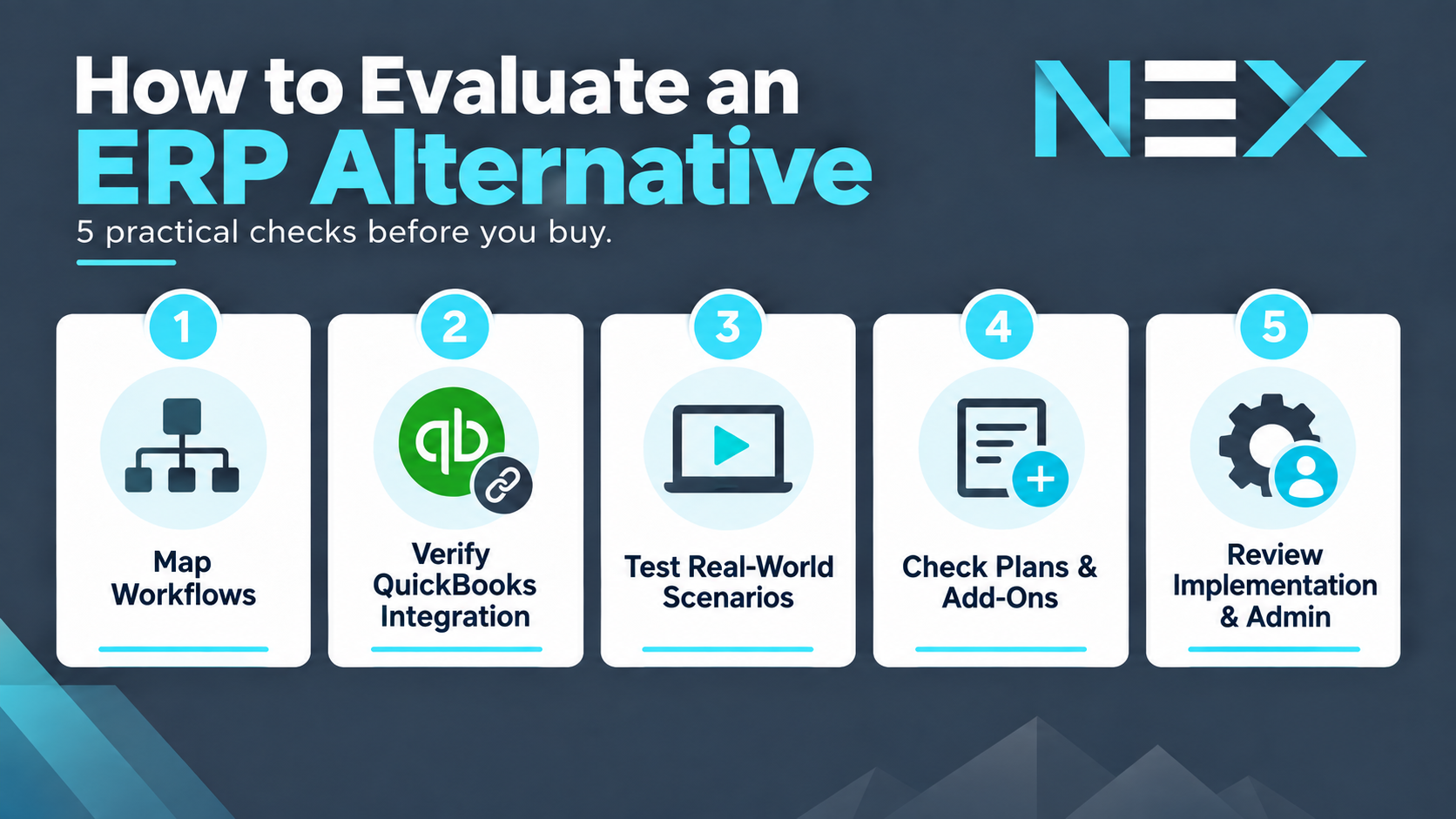
Map the workflows you need to improve. Start with the processes creating the most friction today, such as order entry, inventory allocation, purchasing, receiving, fulfillment, manufacturing, service, or returns. The right platform should improve those workflows without adding unnecessary complexity elsewhere. Involve the teams that work in those processes, including sales, purchasing, warehouse, operations, and finance, so the requirements reflect how work actually moves across departments.
Verify the QuickBooks integration in detail. Confirm which records move between the systems, which platform owns inventory quantities and costs, how invoices and bills are created, how payments synchronize, and how errors or duplicate records are handled. “Integrates with QuickBooks” can mean very different things across products.
Test the difficult scenarios, not just the standard demo. Ask vendors to show how the system handles partial shipments, backorders, inventory shortages, multiple warehouses, returns, substitutions, lot or serial tracking, production requirements, and other situations your team handles regularly.
Understand what requires a higher plan or add-on. Manufacturing, advanced warehouse management, automation, API access, forecasting, traceability, and other important capabilities may not be included in the base subscription. Compare the cost of the configuration you actually need, not just the advertised entry price. Also confirm how the platform scales as transaction volume, users, locations, or workflow requirements increase.
Evaluate implementation and ongoing administration. Consider how much data needs to be migrated, which workflows need configuration, who will own the system internally, what training is required, what implementation and ongoing support the vendor provides, and how future changes will be handled. A platform that fits the operation well is more important than one with the longest feature list.
The goal is to choose software that removes operational bottlenecks while keeping the accounting environment and overall system architecture manageable as the business grows.
Read More: How to Use QuickBooks Enterprise Integration with ERP Software
Outgrowing QuickBooks does not always mean replacing it. In many growing businesses, the bigger challenge is managing the processes around accounting: inventory, purchasing, sales orders, warehouses, manufacturing, fulfillment, service, and returns.
ERP alternatives can address those gaps without forcing the business into a full ERP implementation. The right platform should reduce manual work, improve visibility, and connect the workflows that have become difficult to manage across spreadsheets and disconnected tools.
The best choice depends on which workflows need more control and how complex those workflows have become. Some companies may only need stronger inventory and order control. Others need purchasing, warehouse management, manufacturing, service, and customer workflows connected in one environment.
For businesses in that second group, NEX Driver provides a configurable enterprise management layer around QuickBooks, bringing orders, purchasing, inventory, warehouses, manufacturing, service, and related workflows together while QuickBooks continues to handle accounting. If inventory is one of the primary operational gaps, NEX’s Inventory Management Software for QuickBooks provides a more focused look at how that model works in practice.
You may need an ERP system when core business processes such as inventory, purchasing, manufacturing, order management, and financial reporting are becoming difficult to manage across separate tools and departments. If QuickBooks or another accounting system still meets your financial needs and most of the problems are operational, an ERP alternative may be the more practical next step.
A traditional ERP system typically combines financial management with a broad range of operational functions in one enterprise resource planning platform. An ERP alternative may focus more specifically on inventory, purchasing, warehouse management, manufacturing, CRM, or workflow automation while allowing existing accounting software to remain in place. This can reduce the cost and complexity of replacing the entire software environment at once.
Yes. Many ERP alternatives integrate with cloud-based accounting software so operational and financial data can move between systems. Before choosing a platform, confirm which records synchronize, which system manages inventory and costs, and how invoices, bills, payments, or other transactions flow between the two systems.
Start with your actual business requirements and the key processes that need improvement. Compare operational capabilities, integrations, automation, reporting, advanced features, scalability, implementation costs, and any required add-ons. Consider total cost of ownership, including implementation, integration, data migration, training, required add-ons, and ongoing support, rather than comparing products only by their advertised subscription price.
A full ERP may make more sense when the business needs advanced accounting, multi-entity consolidation, broader financial reporting, or more standardized processes across departments and locations. It can also be the right fit when the existing accounting system itself needs to be replaced. Company size matters less than the overall scope of the organization’s financial and operational requirements.

1 min read
If you're using QuickBooks, you've probably realized its inventory management features only go so far. Are you manually updating inventory data,...

1 min read
QuickBooks Online is one of the most widely used accounting systems for small and mid-sized businesses. It handles bookkeeping, invoicing, financial...
1 min read
Ever feel like your business is drowning in spreadsheets and struggling to stay organized? You're not alone. Many small businesses face the same...