
The Benefits of Integrating QuickBooks with Enterprise Software: Scaling Your Business Efficiency
Managing finances across multiple platforms can quickly become a bottleneck for growing businesses. As complexity increases, so does the need for...

Discover how NEX significantly enhanced First Atlantic Commerce's
operations, billing processes, and overall data management efficiency.
9 min read
Still relying on disconnected systems to manage customer data and operations? If your CRM and ERP platforms don’t communicate, you’re not just creating extra work. You’re introducing delays, data inconsistencies, and operational blind spots across your business.
According to Fortune Business Insights, the global CRM market is projected to grow from over $100 billion to more than $260 billion by 2032, highlighting the increasing need for businesses to unify customer and operational data in real time.
Yet many IT teams are still stuck managing fragile integrations, siloed systems, and manual workarounds that limit visibility and slow down growth.
This guide breaks down how CRM ERP integration actually works, the architectures you can use, and how to choose the right approach for your business. Whether you're connecting existing systems or evaluating a unified platform like NEX, you’ll learn how to build a scalable, secure integration that supports long-term growth.
When CRM and ERP systems operate in silos, teams waste hours re-entering data, reconciling reports, and fixing broken syncs. These inefficiencies slow down revenue, inflate IT overhead, and create unnecessary risks.
Worse, they fracture visibility. Sales can’t check inventory or payment terms. Finance works with outdated forecasts. Support teams are stuck with incomplete customer relationship management data that limits their ability to respond quickly.
For IT, the long-term burden is even worse. Every patch, custom script, or point fix adds complexity and technical debt. Instead of enabling growth, disconnected systems become the very thing that holds the business back. A well-integrated CRM and ERP system delivers:
With the right integration solution, IT can shift focus from maintenance to innovation. That’s the real value: building a system that scales with the business, not against it.
Not all CRM-ERP integrations are built the same way. The right approach depends on your system complexity, scalability requirements, and long-term architecture strategy.
Businesses typically integrate CRM and ERP systems using point-to-point connections, middleware platforms, native integrations, or unified ERP-CRM solutions. Each approach comes with trade-offs in flexibility, cost, and maintenance, making it critical to choose based on how your systems and workflows are expected to evolve.
| Integration Method | Complexity | Scalability | Cost | Best For |
|---|---|---|---|---|
| Point-to-Point | Low | Low | Low | Simple, one-off integrations between two systems |
| Middleware / iPaaS | Medium–High | High | Medium–High | Businesses managing multiple systems and workflows |
| Native Integration | Medium | Medium | Medium | Platforms with built-in connectors and limited customization needs |
| Unified ERP-CRM Platform | Low–Medium | High | Medium | Businesses seeking a single system with minimal integration overhead |
Best suited for simple, one-to-one integrations, point-to-point connections are quick to implement but become difficult to scale. As more systems are added, maintenance complexity increases, and small changes can break multiple dependencies.
Middleware platforms provide a centralized integration layer that enables scalable, flexible data exchange across systems. This approach is ideal for growing businesses but requires proper governance, API management, and ongoing maintenance.
Some CRM and ERP platforms offer built-in connectors that simplify integration. While convenient, these integrations are often limited in customization and may not support complex or evolving business workflows.
A unified platform combines CRM and ERP capabilities into a single system, eliminating the need for external integrations. This approach reduces technical overhead, improves data consistency, and simplifies system architecture. Platforms like NEX are designed specifically to support this model, enabling businesses to manage customer, financial, and operational data in a single scalable environment.
Choosing the right CRM ERP integration approach depends less on the tools themselves, and more on how your systems, data, and teams need to operate together over time. Instead of focusing only on implementation, evaluate the broader impact on your business:
In practice, the decision often comes down to whether you want to manage integrations as your systems grow—or reduce that complexity altogether. Organizations prioritizing scalability, data consistency, and operational efficiency tend to favor approaches that minimize integration overhead and support unified workflows.
Before you connect systems or configure APIs, you need a clear plan. This section outlines integration best practices to ensure your CRM and ERP platforms are ready to work as one system. A smart integration setup reduces risk, avoids wasted effort, and supports real business needs across your entire organization.
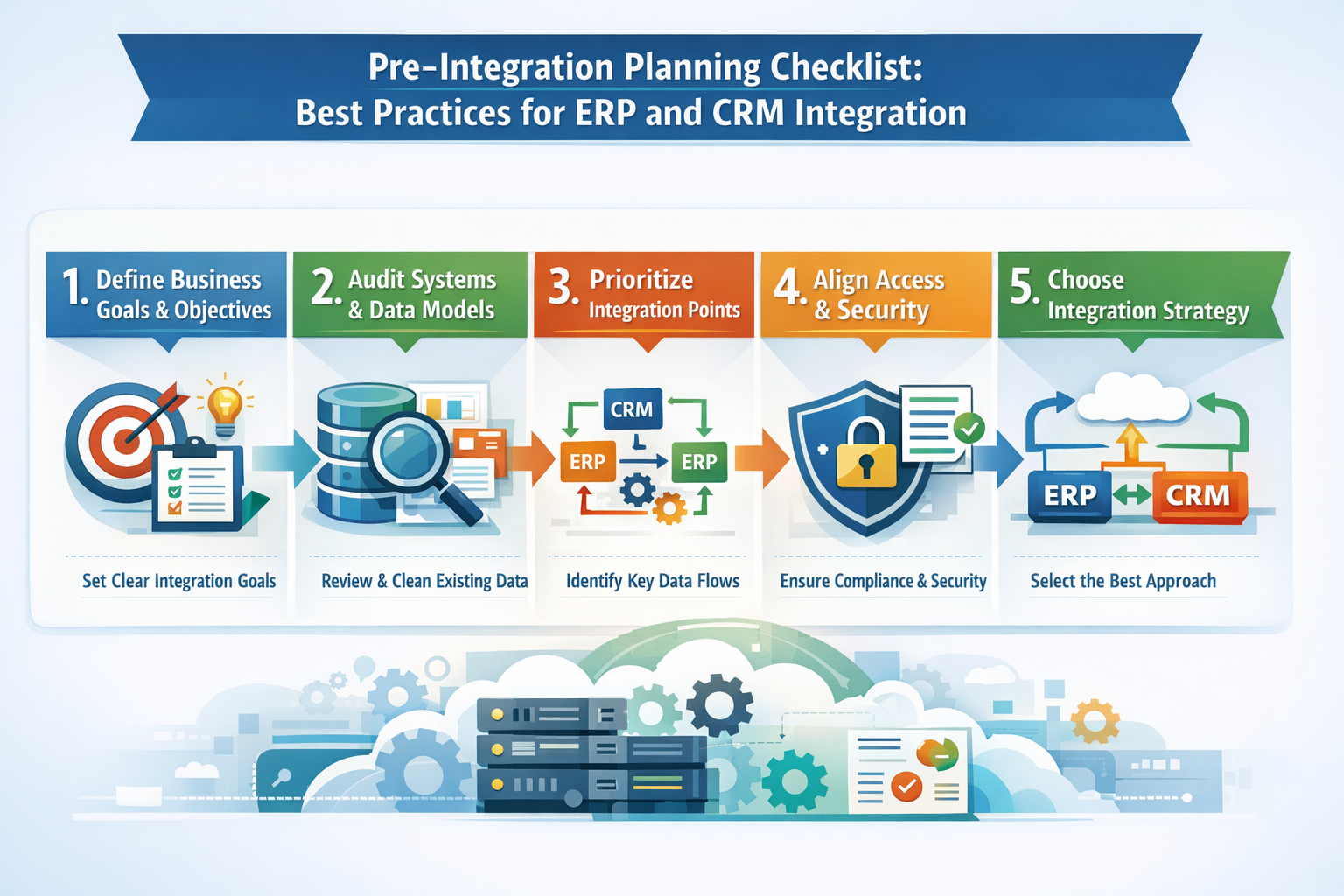
Every integration starts with clarity. Are you trying to reduce duplicate entries? Improve sales-to-invoice handoffs? Align CRM data with ERP financials? Link your goals to business outcomes. For example, improving quote-to-cash workflows or enabling real-time access to customer information across departments.
Whether you’re working with cloud-based CRM platforms or legacy ERP tools, the business process should dictate the integration, not the other way around. This step also helps determine the right approach: simple point-to-point integration, middleware, or a unified ERP-CRM platform like NEX.
A successful integration depends on clean, consistent data. Audit your CRM and ERP systems to identify overlapping fields, naming conflicts, and broken relationships between objects like customers, orders, or product codes.
If your CRM stores customer interaction history differently from how your ERP handles billing records, you’ll run into sync issues. Clean the data now to avoid integration breakdowns later. This is especially critical when integrating your CRM with enterprise resource planning systems that manage finance, procurement, or supply chain management.
Don’t connect everything. Focus on the data flows that drive business outcomes:
These touchpoints should reflect actual cross-system workflows. Prioritizing them keeps your integration light, fast, and easier to troubleshoot, especially as your ERP and CRM platforms evolve.
CRM-ERP integration exposes data to more teams. Make sure your systems support:
If you're using ERP tools like SAP or Oracle, verify API limits, user access models, and third-party licensing implications. One misstep here can lead to failed syncs or worse, data breaches.
How you connect systems matters. Consider your current complexity and future scale:
Choose based on long-term integration needs. Can this strategy support sales and marketing teams as they scale? Will it allow CRM data to be integrated cleanly with ERP modules like finance or supply chain? The right architecture supports business growth, not just short-term fixes.
Pre-integration planning isn’t busywork. It’s the foundation of sustainable system integration. By setting clear goals, cleaning your data, and choosing the right integration solution, you’ll avoid technical debt and create a platform that supports your business process from day one.
Once your planning is complete, it’s time to connect your platforms. This section covers best practices to integrate CRM and ERP systems without disruption, downtime, or endless troubleshooting. These methods apply whether you're working with middleware, APIs, or a unified ERP-CRM solution.
Start by selecting an integration architecture that fits your current system complexity and future growth. Point-to-point setups may work for basic needs, but they’re brittle and hard to scale, especially as ERP solutions evolve or your tech stack grows. Middleware and iPaaS solutions are better suited for businesses managing multiple platforms and diverse workflows.
Unified ERP and CRM platforms like NEX remove the need for third-party connectors altogether. This model reduces technical debt, simplifies data flows, and creates a more durable integration foundation. When you choose based on long-term business needs, not just deployment speed, you future-proof your infrastructure.
Data mismatches are the number one cause of failed integrations. Before connecting systems, audit both your ERP and CRM data. Standardize formats, align field names, and remove duplicates. Ensure records like customers, orders, and payments follow a consistent logic across tools.
This process is essential for building a single source of truth. If CRM tools and ERP systems define core objects differently, you’ll hit sync errors the moment integration begins. Don’t start until the data is ready.
Integration depends on reliable system communication. Use authenticated APIs to manage data flow securely between platforms. Define token management, endpoint structure, and error handling upfront.
For ERP tools like SAP or Microsoft Dynamics, check rate limits, session durations, and licensing restrictions. If your CRM is integrated with a high-volume ERP, batch processing and retry logic are critical. Treat API stability as a core part of your integration solution, not an afterthought.
Never launch without simulating actual business workflows. Test the full cycle: creating a sales order in the CRM, updating inventory in the ERP, generating invoices, and syncing customer payments.
Include edge cases. What happens if required fields are missing? How are partial transactions handled? Real testing ensures your integration won’t break during high-traffic periods or unusual transactions. This is where most integrations fail, so don't skip it.
Once integrated, systems only succeed if people know how to use them. Train teams by function. Sales and marketing teams should understand how CRM data connects to ERP workflows. Finance and operations must know what data is updated automatically and what still requires input.
After launch, monitor for sync failures, adoption gaps, and performance slowdowns. Use analytics tools to track errors and optimize your workflows. Integrating your ERP and CRM systems is not a set-it-and-forget-it project; it’s a system that needs attention to stay strong.
When done right, ERP-CRM integration creates a powerful, unified platform that supports customer relationships, financial operations, and supply chain execution. These best practices help ensure you don’t just connect two systems; you build a solution that scales, adapts, and drives better business outcomes.
Even with the right strategy, integrating your CRM and ERP systems often surfaces hidden issues that disrupt workflows, compromise data, or create long-term complexity. Knowing what can go wrong and how to fix it helps you build a more reliable integration from day one.
ERP and CRM platforms rarely speak the same data language. A “customer name” field in one system may be a “billing account” in another, with different formats, field lengths, or validation rules.
Fix it: Map data fields clearly before you integrate your CRM and ERP. Use transformation rules to standardize formats. This reduces errors and helps create a single source of truth across both systems.
CRM and ERP platforms rely on APIs to move data. But most have rate caps, session timeouts, or call limits, especially in platforms like SAP ERP or Microsoft Dynamics. When integration traffic spikes, sync failures can cascade.
Fix it: Build retry logic into your integration solution. Use batching or delayed syncs where real-time isn’t required. Understanding API quotas early helps prevent slowdowns and sync corruption under load.
ERP and CRM systems often assign permissions differently. A user with edit access in the CRM might be blocked from updating key financial data in the ERP. These mismatches can cause record rejections, data gaps, or access errors.
Fix it: Standardize roles across both platforms. Define who owns what and set role-based controls at the system level. When CRM tools and ERP modules operate on consistent rules, sync issues drop sharply.
Point-to-point integration might seem fast, but it creates brittle dependencies. One platform update or even a minor API change can break the entire connection. This becomes a liability as the system scales.
Fix it: Use a scalable integration platform or choose unified ERP-CRM solutions that require less maintenance. A cleaner architecture helps ensure the integration creates long-term reliability instead of short-term patches.
Many teams treat integration as a one-time task. But without monitoring, failed syncs, missing records, or data misalignment can go undetected until users complain—or worse, customer operations are affected.
Fix it: Set up real-time alerts, error logs, and sync dashboards. Integration isn’t static. Monitor usage daily, especially during rollout. This helps IT teams catch issues early and optimize the platform continuously.
Even the best-designed integration can fail without planning for the real-world issues that surface after launch. These challenges are common but avoidable. A stable CRM-ERP integration improves operational resilience, reduces IT firefighting, and strengthens data accuracy across departments. When built with care, integration helps connect people, systems, and business processes through one unified platform.
Most integrations rely on patches, middleware, or fragile API scripts that break under pressure. NEX takes a different approach. It’s a unified ERP-CRM platform designed from the ground up to remove friction, reduce IT overhead, and support real business workflows.
With NEX, you don’t need third-party tools to connect your CRM and ERP systems. Sales, finance, inventory, and operations all work from the same platform, so data flows naturally, updates are instant, and sync failures don’t exist.
NEX provides:
This isn’t just about connecting two systems. It’s about giving IT teams control without complexity, enabling faster decisions, and delivering a better customer experience across the lifecycle. If you're managing disconnected CRM and ERP platforms, NEX helps eliminate silos and create a system that actually works, without constant maintenance.
Disconnected systems slow everything down. They create duplicate work, sync failures, and blind spots that IT teams are forced to patch instead of solve. But it doesn’t have to stay that way.
Integrating your CRM and ERP isn’t just about syncing data. It’s about building one system that supports your entire business, including sales, finance, supply chain, and beyond. When done right, CRM-ERP integration eliminates silos, improves accuracy, and gives every department access to real-time, reliable data.
NEX makes that easy. With a unified ERP-CRM platform, you can skip the middleware, remove integration risks, and connect the tools your business already runs on. Schedule a free integration consultation to see how NEX can help you integrate your CRM and ERP systems with less friction, lower overhead, and more control.

Managing finances across multiple platforms can quickly become a bottleneck for growing businesses. As complexity increases, so does the need for...

You are about to integrate inventory management software with QuickBooks. Before you click connect, pause. Are you confident your data will survive...
Modern buyers expect updates the moment they place an order. They want to know exactly when it ships, arrives, and how it’s been handled. If your...